Why Hardware Macros Beat Software Macros
Every macro setup answers one question: where does the remapping live? In a background process on your OS, or in the device itself? That one choice decides whether your macros survive a reboot, a new computer, a different operating system, or an IT policy that blocks unsigned executables. Most people pick software because it's what they found first. Here's the actual trade, and how to get the best of both.
Skip to it: write macros in Lua once, run them on any OS, free →
What software macro tools can't escape
- OS lock-in. AutoHotkey is Windows. Keyboard Maestro is macOS. Your muscle memory doesn't transfer because your tooling doesn't.
- Fragility. A software remap is a process. OS updates break hooks, focus quirks eat inputs, and elevated windows ignore your remaps entirely.
- Zero portability. New machine, work laptop, a friend's PC: your setup lives in an install, not in your hands.
- Timing jitter. A user-space process delivers input when the scheduler lets it. Usually fine; never guaranteed.
What moving it into hardware changes
A hardware remapping device enumerates as a plain USB HID keyboard. The computer doesn't know or care what happens upstream. It sees keystrokes, delivered with device-level timing:
- Any OS, zero installs. Windows, macOS, Linux, a locked-down corporate box: if it accepts a keyboard, your full setup works.
- Determinism. Remaps run in firmware, not in a process that can be preempted, crashed, or updated out from under you.
- The device is the config. Unplug, pocket, replug. Your entire setup travels in your bag, not in an installer.
- Your keyboard stays. It sits between any keyboard and the PC. The board you love keeps its job.
What the API feels like
This is a complete, running script. With Rebind Link attached, it inverts your mouse in real time at up to an 8,000 Hz report rate, no drivers:
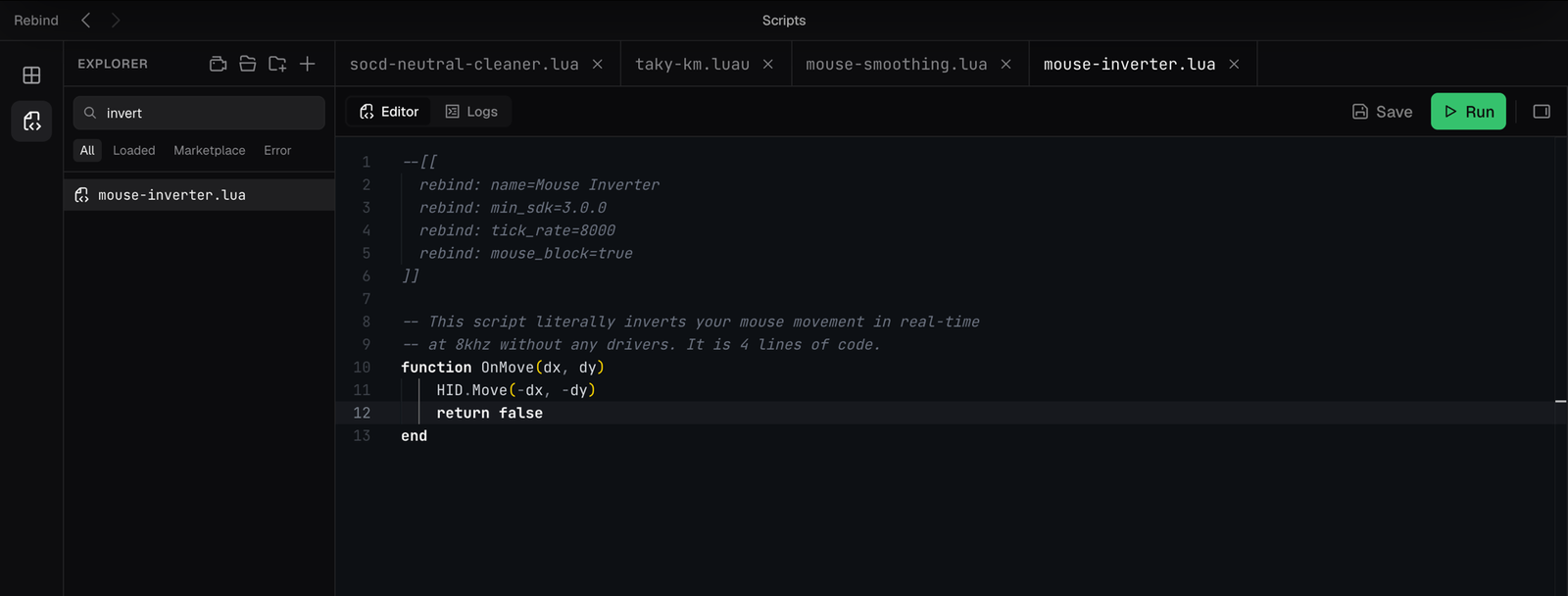
OnMove intercepts the mouse, HID.Move(-dx, -dy) sends the inverse, return false swallows the original. That's the whole programming model.A cross-platform AutoHotkey alternative, free first
Here's the part most macro guides miss: you don't choose hardware or software. You write scripts once and decide where they run. Rebind scripts are Lua. In the free app they run in software mode on Windows, macOS, or Linux: same editor, same API. Your AutoHotkey-style remaps, layers, and app-specific profiles, portable across every OS from day one. When a script becomes part of how you work, graduate it to hardware: the identical code runs unchanged on Rebind Link, our pre-flashed USB device, and gains firmware-level timing and true plug-anywhere portability.
 Start free in software, then graduate the same script to hardwareOne Lua API. Windows, macOS, Linux today; the identical script runs on the hardware when you're ready.
→
Start free in software, then graduate the same script to hardwareOne Lua API. Windows, macOS, Linux today; the identical script runs on the hardware when you're ready.
→
As with any input tool, game and platform rules on automation apply. Check yours.