Your Keyboard Is Already a Leverless Controller
A leverless controller is, mechanically, a handful of buttons: four directions under your fingers instead of a stick under your palm. A $250 leverless and the keyboard on your desk are the same input concept. The one thing separating them (how opposing directions resolve) takes about five minutes to fix, and the software to do it is free.
Skip to it: Rebind adds SOCD cleaning to the keyboard you own. Free, five-minute setup →
What the rules actually require
Major fighting-game rulesets require button-based controllers to clean SOCD inputs: the standard is left + right resolves to neutral (up + down varies by ruleset). The intent: no controller keeps a back-charge while the game sees you walking forward, or blocks both cross-up sides at once.
Stock keyboards don't do this. Hold left and right on a plain keyboard and the game receives both. What happens next is engine-dependent and inconsistent. Fix that one gap and the keyboard you've spent years building muscle memory on resolves inputs the way a tournament leverless does.
Set it up in five minutes
- Download Rebind (free) and open it.
- Create a new script and paste the cleaner from the box below, or load the bundled Opposing-Key Resolver example and flip on Neutral Mode.
- Run it. Left and right now cancel to neutral, tournament-style. F11 toggles it off when you're back to typing.
 Download Rebind freePaste the script and your keyboard resolves like a leverless in five minutes. Windows, macOS, Linux.
→
Download Rebind freePaste the script and your keyboard resolves like a leverless in five minutes. Windows, macOS, Linux.
→
The full script (~45 lines of Lua)
-- rebind: name=SOCD Neutral Cleaner
-- rebind: min_sdk=3.0
-- up-on-thumb layout? set up = "SPACE" and the cleaner follows.
local KEYS = { left = "A", right = "D", up = "W", down = "S" }

local cfg = UI.Schema({
  enabled    = UI.Toggle(true,  { label = "Enable SOCD" }),
  toggle_key = UI.Keybind("F11", { label = "Toggle Hotkey" }),
})

local AXIS = {
  [KEYS.left]  = { KEYS.left, KEYS.right },
  [KEYS.right] = { KEYS.left, KEYS.right },
  [KEYS.up]    = { KEYS.up, KEYS.down },
  [KEYS.down]  = { KEYS.up, KEYS.down },
}

local held, sent = {}, {}

local function send(key, down)          -- only emit on state change
  if sent[key] == down then return end
  if down then HID.Down(key) else HID.Up(key) end
  sent[key] = down
end

local function resolve(a, b)
  if held[a] and held[b] then           -- both held: neutral
    send(a, false); send(b, false)
  else
    send(a, held[a] or false)
    send(b, held[b] or false)
  end
end

function OnDown(code)
  if code == cfg.toggle_key then
    UI.Set("enabled", not cfg.enabled)
    return false
  end
  local axis = AXIS[code]
  if not cfg.enabled or not axis then return end
  held[code] = true
  resolve(axis[1], axis[2])
  return false                          -- swallow the physical key
end

function OnUp(code)
  local axis = AXIS[code]
  if not cfg.enabled or not axis then return end
  held[code] = false
  resolve(axis[1], axis[2])
  return false
end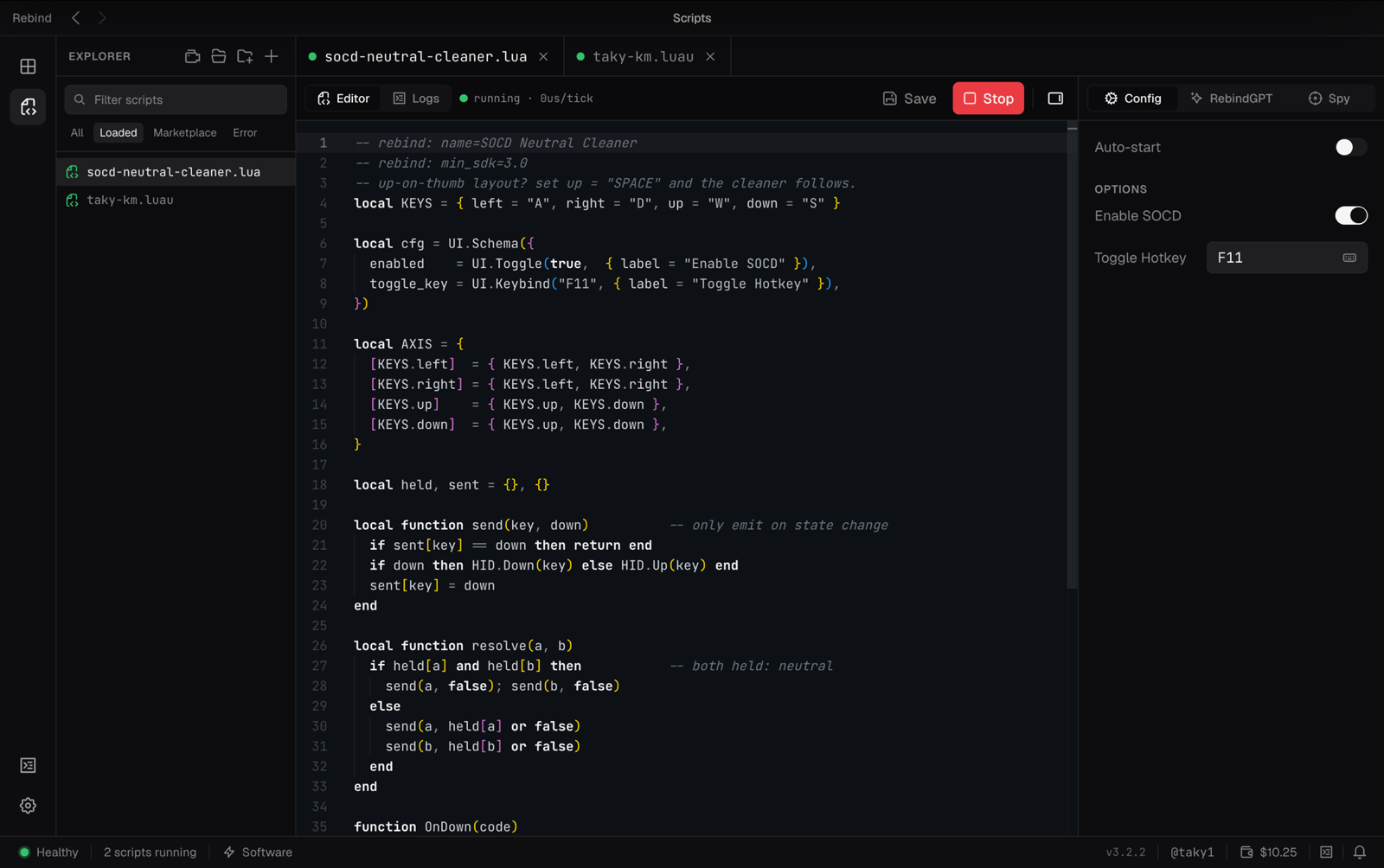
UI.Schema.That's a working neutral-mode SOCD cleaner: it intercepts the direction keys of whichever axis you touched, and whenever both keys on that axis are physically held, the game sees neither. Release one and the survivor comes back instantly. No re-sent events, no state spam. No config files, no firmware flashing, no new keyboard.
The layout
The classic mapping puts directions on the left hand: A/S/D for left/down/right with Space as up, matching leverless ergonomics: up on a thumb. If you run that layout, change one line in the script (up = "SPACE") and the cleaner follows. You already type on this board all day; that's the whole appeal.
Where you can run it
For your PC ranked grind, netplay, and PC-based locals, this is all you need. Console majors are a different story. Those brackets run on PS5, so nothing PC-side applies there. For offline PC events, SOCD language differs between rulesets and organizers have final say on any device. Ask your TO first. If they want the resolution in dedicated hardware with a fixed, inspectable mode, the same script runs unchanged on Rebind Link, our USB device.
Set it up tonightFree download, paste the script, five minutes. Windows, macOS, Linux.
→